HTML-FMX SKILLS / HEALTHCARE CASE STUDY

One wireframe.
Four paths
to FMX.

From a rough healthcare sketch to native Delphi interfaces. A look at what changes, what stays consistent, and what still needs a developer’s attention.

4workflows
1shared wireframe
GPT-6.1 SolHigh reasoning
THE STARTING POINT
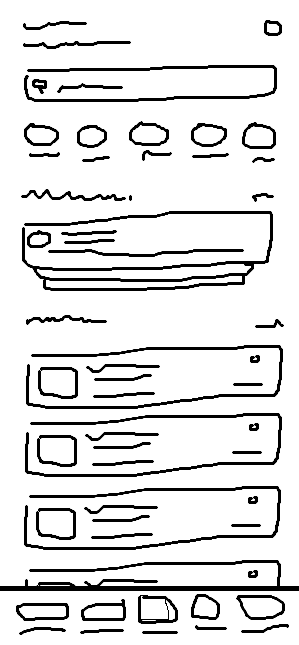
Original hand-drawn healthcare wireframe with search, categories, an appointment card, doctor rows, and bottom navigation
A rough sketch.
A shared starting point for every method.
Native .fmx + .pasEditable in RAD Studio DesignerReusable doctor cards

01 / THE REASON

A good-looking screen
needs a clear structure.

These skills grew out of the author’s observations of how Delphi developers build mobile FMX interfaces.

Desktop layout habits can carry over from VCL without adapting to a small screen. Containers can accumulate until the component tree no longer explains who owns each area. AI speeds up creation, but developers still need a result they can understand and change.

The goal is native, Designer-editable FMX with meaningful sections and reusable cards. A container should have a concrete job in the layout.

Mobile layout decisions
Choose scrolling boundaries and navigation for the screen people actually use.
Clear component ownership
Give sections and cards their own responsibilities, with nesting where the layout needs it.
A result developers can maintain
Keep the fixed UI in .fmx resources and bind changing records through reusable components.

WHERE IT BEGAN

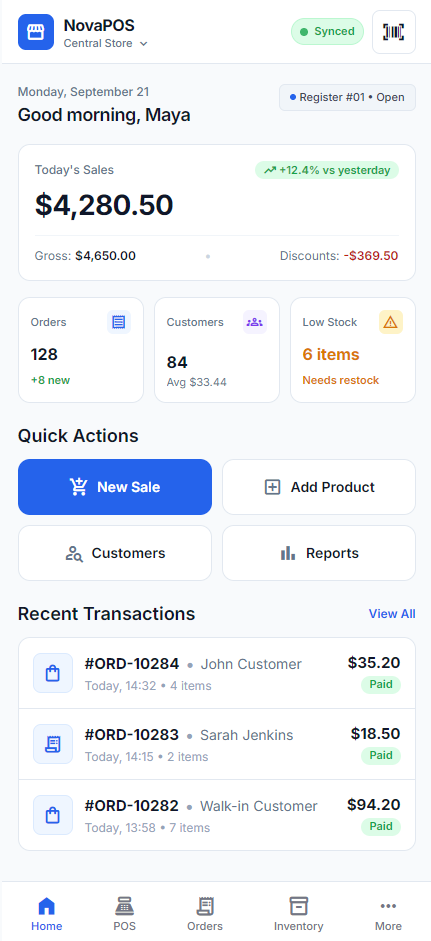
V1: NovaPOS from Google Stitch

The first version focused on HTML mapping, CSS styling, and native FMX conversion. The refined local V2 package adds screenshot mapping, direct UI creation, and review of existing FMX screens.

V1 provides background. Its different design and conditions are not part of this timing comparison.

NovaPOS dashboard source HTML used in the first version

02 / THE SHARED BRIEF

A Healthcare
Appointment App.

A mobile application for patients to find doctors, view upcoming consultations, and choose care for their health needs.

The wireframe defines the information layout. The brief adds the purpose of each area and calls for a simple, modern interface.

  1. Doctor or symptom search
  2. Health categories
  3. Upcoming appointment
  4. Popular doctor list
  5. Bottom navigation, including messages and a profile

THE NATIVE COMPONENT PATTERN

Healthcare page
  Header
  Scroll content
    Search and categories
    Upcoming appointment
    Doctors: TListBox
      TListBoxItem
        DoctorCard: TFrame
  Bottom navigation

The fixed page and card contents remain editable in .fmx. Runtime code creates variable list items and binds their data. Component names vary between methods.

Six skills in the refined local package

html-to-fmx-mapping
Map HTML to an FMX hierarchy.
screenshot-to-fmx-mapping
Map a screenshot or wireframe.
css-to-fmx-style
Map CSS to native style resources.
html-to-fmx
Implement HTML/CSS as native FMX.
create-fmx-ui
Build FMX from a brief or image.
review-fmx-ui
Review and refine existing FMX UI.

The current skill name is create-fmx-ui. The experiment originally referred to it as create-delphi-fmx-ui.

03 / FOUR METHODS

Same sketch.
Different interpretations.

Screenshot view

All four workflows use the same wireframe, healthcare brief, and agent model: GPT-6.1 Sol with High reasoning. Select a screenshot to inspect the original image.

0138m 55s total

Google Stitch
and HTML

Google Stitch MCP, HTML export, then html-to-fmx
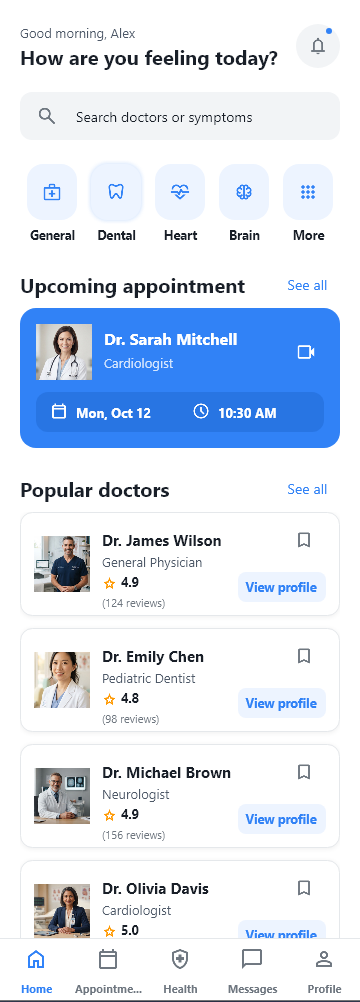
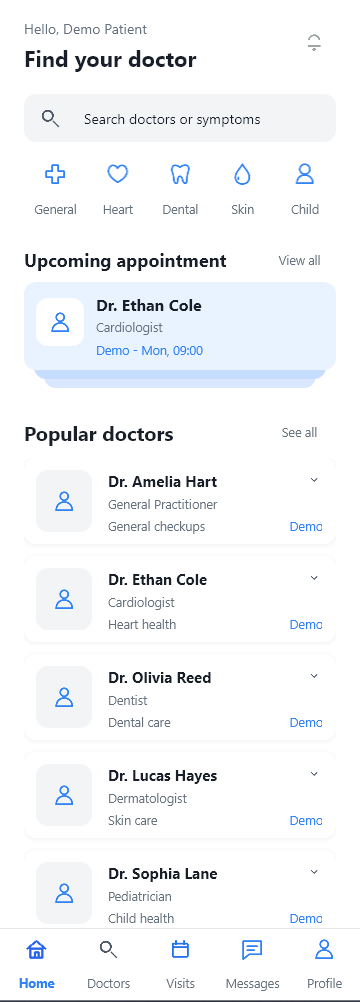
Method 1 healthcare application at runtime with populated appointment and doctor cardsEnlarge screenshot

More polished visuals, clear grouping, and more complete assets. The result follows the wireframe and the DESIGN.md color rules.

Third fastest overall
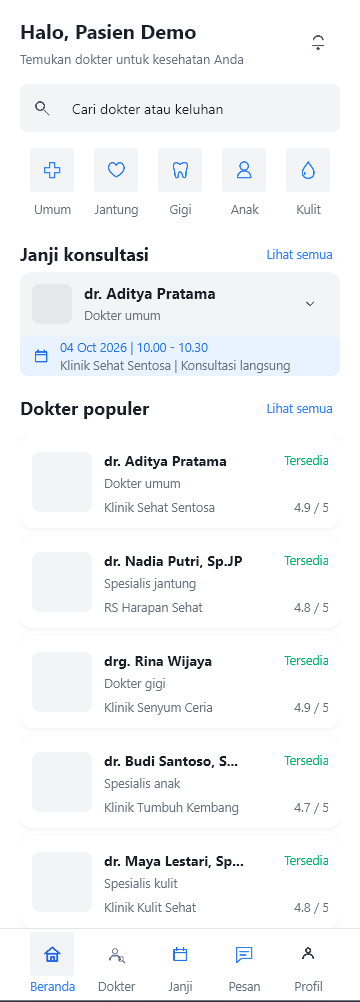
0225m 52s total

Direct
UI creation

Wireframe and brief directly to create-fmx-ui

Method 2 healthcare application at runtime with populated appointment and doctor cardsEnlarge screenshot

Follows the wireframe and DESIGN.md colors. The visuals remain rough, much like Method 3, and provide a foundation for further polish.

Second fastest overall

0355m 22s total

Separate mapping
before UI creation

screenshot-to-fmx-mapping, then create-fmx-ui

Method 3 healthcare application at runtime with a layered appointment card and populated doctor rowsEnlarge screenshot

The closest match to the wireframe layout in the author’s assessment. Visuals remain rough, with no visible gain in polish from the separate mapping stage.

Longest total time

0423m 33s total

Agent-generated
HTML

Agent creates HTML/CSS, then html-to-fmx

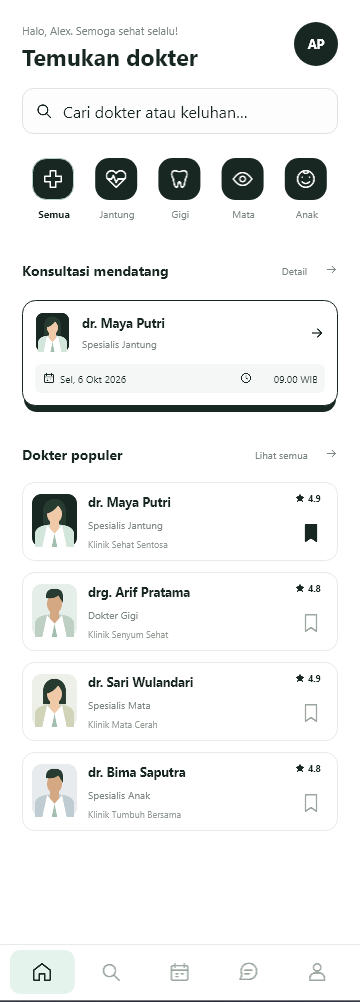
Method 4 healthcare application at runtime with a dark green palette and illustrated doctor portraitsEnlarge screenshot

Satisfactory visuals and the shortest total time. Its palette departs from DESIGN.md because the HTML prompt did not explicitly reference that file.

Shortest total time

Original experiment screenshots. Some application labels remain in Indonesian. The runtime captures contain fictional demo data.

04 / RECORDED TIMINGS

The complete screen
takes more than the first pass.

Each total includes the initial UI and a follow-up prompt to compose the existing cards and populate them with dummy data.

Initial UICards + dummy dataChart scale: minutes
Exact time record
MethodInitial UICards + dummy dataTotal
01 / Google Stitch + HTML32m 49s6m 06s38m 55s
02 / Direct UI creation23m 25s2m 27s25m 52s
03 / Separate mapping8m 16s + 41m 54s5m 12s55m 22s
04 / Agent-generated HTML14m 40s8m 53s23m 33s

2m 19sDifference between the two fastest totals: agent HTML and direct UI creation.

2m 27sThe least additional card work, recorded for direct UI creation.

These are the author’s recorded experiment timings, rather than a general benchmark. They exclude API integration and do not establish the causes of the duration differences.

05 / THE CONCLUSIONS

The hierarchy stays close.
The visual polish varies.

OVERALL COMPONENT HIERARCHY

~90%

similarity across the four results

The author’s estimate from reviewing the outputs. No formal component-tree metric was defined.

Color rules need to reach the source.

In the author’s assessment, Methods 1, 2, and 3 follow the color rules in DESIGN.md. Method 4 uses a different palette. Its HTML generation prompt did not explicitly reference the project’s design guide.

Wireframe fidelity and visual polish are separate judgments.

Method 3 comes closest to the original layout, but its rougher visuals and longer duration make it less satisfactory overall. Method 1 offers more visual polish, while Method 4 is fast and visually satisfying despite its color deviation.

A SHARED GAP IN ALL FOUR WORKFLOWS

The card existed.
The page still needed to use it.

The initial results already included reusable doctor cards. The page frames had not yet created list items, attached the cards, and populated them. Every method needed a follow-up prompt.

“Add dummy data using the card you have already created.”

English translation of the author’s original follow-up prompt. The guide below makes the page composition explicit.

06 / TRY THE WORKFLOWS

A brief. A method.
Then the finishing pass.

These guide prompts are refined from the author’s brief and described workflows. Use them with your own target Delphi FMX project. They clarify the steps rather than reproduce every original prompt word for word.

  1. 01
    Prepare the project

    Open the Delphi FMX project and make the six skill directories available together.

  2. 02
    Provide the same source

    Attach wireframe.png and the shared brief below. The recorded agent setting was GPT-6.1 Sol with High reasoning.

  3. 03
    Choose one method

    Follow one route, then compose the cards with dummy data and inspect the result.

The shared healthcare brief

Build a mobile healthcare UI for patients. The app helps patients find doctors, view upcoming consultations, choose doctors for their health needs, and communicate with healthcare providers.

Follow the wireframe layout: doctor or symptom search, health categories, an upcoming appointment, a popular doctor list, and bottom navigation to messages and a profile. Use a simple, modern interface.
01Google Stitch and HTMLDesign, export, then native conversion

Provide the wireframe and shared brief, create the design through Google Stitch MCP, and export HTML/CSS with its assets before conversion.

1. Generate the design

Use Google Stitch MCP to design the Healthcare Appointment App from this wireframe and brief. Preserve the main areas and their arrangement. Follow the color rules in project/DESIGN.md and include relevant visual assets.

2. Export and convert

Export the design as HTML/CSS. Use the html-to-fmx skill to convert it into native Delphi FMX UI. Preserve the source appearance. Create the page and a reusable doctor card as .fmx and .pas pairs that remain editable in the Designer.
02Direct UI creationOne implementation prompt

Attach the wireframe and shared brief, then submit one implementation request. Screenshot mapping still runs internally within create-fmx-ui.

Create the native page

Use the create-fmx-ui skill to build a Healthcare Appointment App page directly from wireframe.png and this brief. Follow the wireframe layout and the color rules in project/DESIGN.md.

Store the fixed structure as Designer-editable .fmx and .pas pairs. Create a reusable doctor card for the doctor list and prepare bindings so the page can use it. Follow the existing project structure and StyleBook.
03Separate mapping before UI creationA mapping document, then implementation

Complete the component map first. Pass that document, the wireframe, and the brief to the implementation stage.

1. Map the wireframe

Use the screenshot-to-fmx-mapping skill to map the wireframe and brief into an FMX component hierarchy. Separate fixed areas, scrolling content, bottom navigation, and the doctor list with a reusable card. Save the result as a mapping document.

2. Implement the map

Use the create-fmx-ui skill to implement the UI from that map. Follow the color rules in project/DESIGN.md. Create Designer-editable .fmx and .pas pairs, then prepare binding for the page and doctor card.
04Agent-generated HTMLGenerate HTML/CSS, then native conversion

This HTML-stage prompt intentionally omits DESIGN.md, consistent with the recorded experiment. The suggested design-guide instruction appears separately below.

1. Generate the HTML/CSS

Convert the wireframe and Healthcare Appointment App brief into a mobile HTML/CSS page. Preserve the main areas and their arrangement. Use a simple, modern interface. Include the required assets and save the HTML/CSS source.

2. Convert to native FMX

Use the html-to-fmx skill to convert that HTML/CSS into native Delphi FMX UI. Preserve the source appearance. Create the page and a reusable doctor card as .fmx and .pas pairs that remain editable in the Designer.

AFTER ANY OF THE FOUR METHODS

Compose the cards and finish the demo.

Once the page and reusable cards exist, make their connection explicit.

Follow-up prompt for dummy data

Add fictional dummy data using the cards already created. Implement the cards on the UI page: create list items, attach card instances, and populate them through the existing bindings. Load demo data once when the page is created. Preserve later data bindings, including empty results.

Open the page in RAD Studio Designer, then run the app. Compare the hierarchy, card appearance, scrolling area, and bottom navigation with the wireframe. Check color consistency with DESIGN.md and record the checks you actually perform.

A SUGGESTION FOR THE NEXT EXPERIMENT

Carry DESIGN.md into the HTML stage.

To address Method 4’s palette deviation, add an explicit instruction before generating HTML/CSS. This refinement has not been tested in the recorded experiment.

Additional design instruction

Before creating HTML/CSS, read project/DESIGN.md and use its color tokens. Preserve those color rules during FMX conversion.

THE DEVELOPER’S PART

AI creates the UI.
You own what
happens next.

Skills help keep component ownership and visual rules clear. Developers still review the output and complete its integration.

Designer and runtime screenshots show the visible results. Maintainability, callbacks, API integration, device coverage, and performance need further checks. The runtime platform was not specified for these captures.

Download the English deck

26 slides, including prompts and presenter notes

Open original